
Spreadsheets know where customers are. They don't know who needs you next.
Most dealers start by tracking territories in a spreadsheet — a column for the customer, a column for the city or ZIP, maybe a column for the assigned rep. That's a fine start, and it answers one question: where are my customers? It can't answer the question that actually plans your week: which of these customers should I visit next, and why?
The reason is that a spreadsheet holds addresses, not relationships. It doesn't know that the customer in the north end owns a machine that's twelve years old, or that the one downtown hasn't had a service call in eighteen months, or that a tech flagged a failing unit at a third last month. Those are the facts that decide where you should drive — and they live somewhere else entirely, in service records, old invoices, or a tech's memory.
So territory tracking, done the usual way, becomes a guessing game layered on top of a spreadsheet. The reps who are good at it carry it in their heads. The ones who aren't lose deals to forgetting. Either way, the business depends on memory, and memory doesn't scale past a few hundred customers.
Tie the customer to a place, attach the equipment, and put it all on a map
Here's a practical, tool-agnostic method for tracking service customers across territories. You can approximate it in spreadsheets and a mapping tool, or do it cleanly in software built for it. The steps are the same.
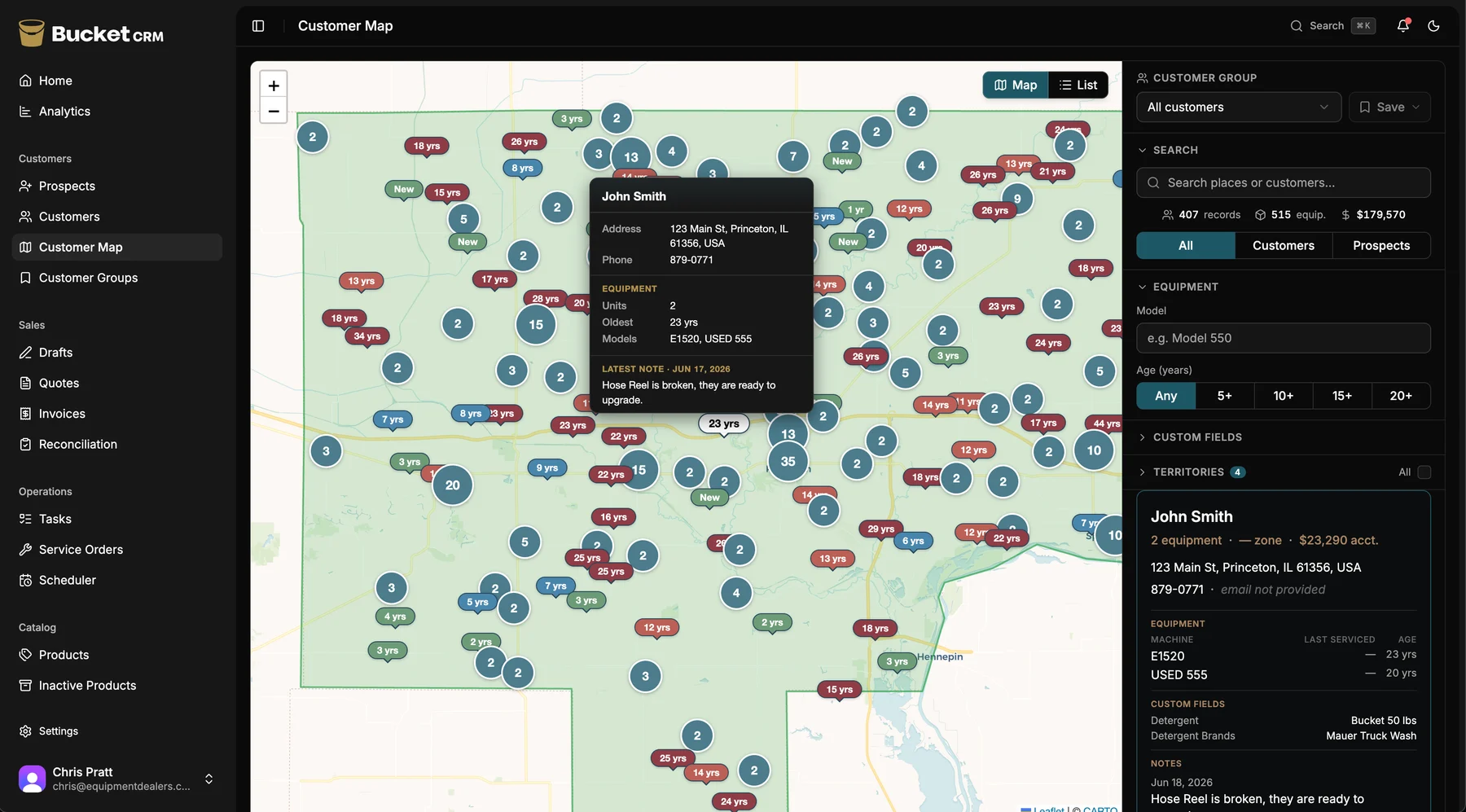
Step 1 — Give every customer a geographic home. Assign each customer to a territory or region, not just an address. This lets you slice the whole base by area: this rep's territory, that service zone, the north end versus the south. Without this, you can map pins but you can't manage by territory.
Step 2 — Attach equipment and service history to the customer. This is the step the spreadsheet skips. Record the machines each customer owns — model, age, purchase date — and tie every service call to the specific machine. Now a customer isn't just a dot on a map; it's a dot that knows what it owns and when it was last touched.
Step 3 — Put the whole territory on a map. A list can't show you a territory the way a map can. Plot every customer geographically and color-code the pins by something that matters — equipment age, time since last service, or open opportunities. Now the question "who do I visit next?" has a visual answer: the red pins.
Step 4 — Make it live, and make it mobile. A territory map is only useful if it's current and you can pull it up from the truck. If updating it is a weekly office chore, it's stale by Wednesday. The map should update as service calls are logged and equipment ages, and it should be in the rep's pocket, not on a desktop back at the office.
Step 5 — Plan from the map, not from memory. Once the map is live, planning a week becomes a five-minute task: open the territory, look at the pins that need attention, and route your visits. The customers you see are the ones the data says to see — not just the ones you happened to remember.
Watch for the four things that quietly break territory tracking
Keeping equipment and customers in separate systems. If the service history lives in one place and the customer list in another, the map can never show equipment age, and you're back to guessing. The single most important move is getting the equipment onto the customer record.
A map that nobody updates. A territory map built once and never refreshed is worse than no map, because people trust it. It has to update automatically as service calls happen and machines age.
Desktop-only access. If the territory view lives on an office computer, the rep in the field can't use it where the decisions actually get made — in the truck, between stops. Mobile access is what turns territory data into territory action.
Tracking location but not opportunity. Knowing where customers are is table stakes. The version that grows your business tracks why to visit — the aging machine, the overdue follow-up, the tech's flagged lead. That's the difference between a map of your customers and a map of your next sales.
When it works, your territory becomes a second way to find revenue
When customers, equipment, and a live map all live in one place, territory tracking stops being a chore and becomes an engine. You open your territory and the upgrade conversations light up on their own — the machines aging past ten years, the customers overdue for a visit. You're no longer depending only on word of mouth and the phone ringing; you can go find the next sale in the customers you already have.
This is exactly the problem Bucket's Opportunity Map was built to solve. Every customer pinned on your territory, color-coded by equipment age, updating as your techs log service calls from the field — so planning a week takes five minutes and the visits you make are the ones most likely to turn into sales. It's one way to do the method above; it just happens to be built for equipment dealers specifically.
Whether you build it in spreadsheets or run it in software, the goal is the same: stop carrying your territory in your head, and start seeing it on a map that knows who needs you next.