
Compare · Bucket vs Maximizer
Maximizer is a general-purpose CRM that has, in recent years, focused itself on financial services — its marquee customers today are wealth managers, banks, and credit unions. For a financial advisor, that focus is an advantage. For an equipment dealer, it's a sign of the deeper truth: Maximizer was never built for a business that sells a machine and then services it for the next ten years. There's no real concept of the equipment a customer owns, the service history on each machine, or the field techs who keep it running. We know this fit problem especially well, because the person who started Bucket lived it. He ran his equipment dealership on Maximizer — paid for three seats that never fit — and when he decided to leave, Maximizer charged him a fee just to export his own customer list. Bucket is the tool he wished he'd had, built so no dealer ever has to live that again.
You probably want Bucket if:
Maximizer is probably fine if:
The rest of this page walks through why, with real examples from an equipment dealer's week — and the export-fee story that started Bucket.
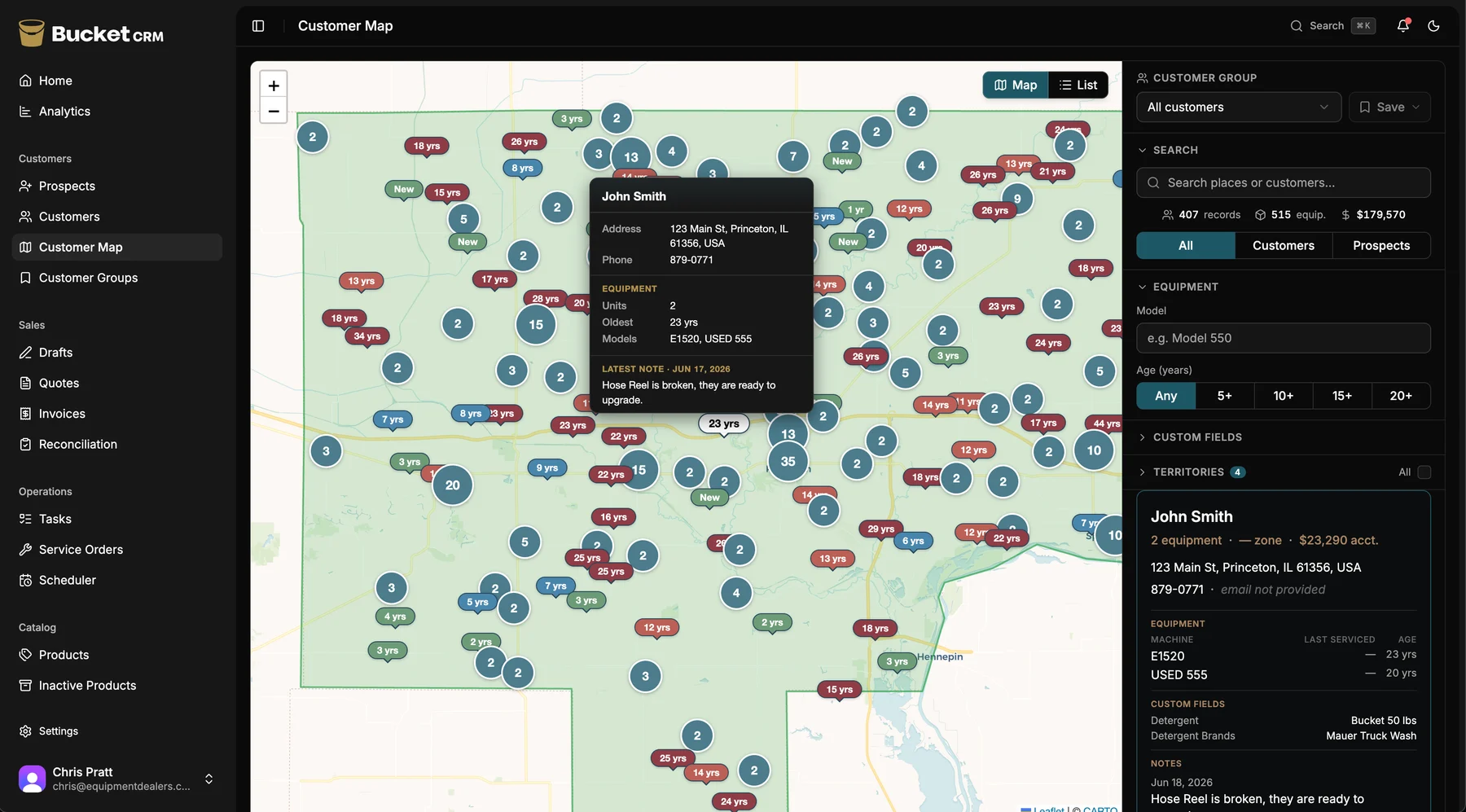
The difference, in one screen
The Opportunity Map puts your whole territory on one screen, color-coded by equipment age. A general contact CRM like Maximizer can't produce it.
Why this comparison matters
Maximizer started as a general-purpose CRM — contacts, calendars, a sales pipeline, the building blocks any sales team uses. In recent years it has narrowed its focus, and the industry it chose to specialize in is financial services. Look at who Maximizer features today and it's wealth-management firms, banks, and credit unions. That's a smart strategy for Maximizer, and it makes Maximizer genuinely good for financial advisors.
It also makes the fit problem for an equipment dealer impossible to miss. A CRM that's built its recent features around wealth managers is, by definition, not building them around shops that sell and service equipment. Your business doesn't revolve around a portfolio or a client review cycle. It revolves around a customer who bought a machine from you, the age and condition of that machine, the service you've done on it for years, and the day it's ready to be replaced.
An equipment dealer's relationship lives in the equipment, and Maximizer has no concept of equipment. You can try to fake it — a custom field here, a note there, an attachment on a contact record — but you're hand-building the most important part of your business out of parts the software gave you for something else. Every time you add a salesperson or change how you do it, the hand-built version drifts a little further from reality. The founder of Bucket did exactly this for years before he gave up on it.
Bucket starts where your business starts: the customer owns machines, each machine has an age and a service history, the sale and the service live on the same record, and the upgrade conversation surfaces on a map of your territory. You're not configuring a financial-services CRM to approximate an equipment dealership. The equipment dealership is what it was built for.
A week in the life
Here are four real moments from an equipment dealer's week, and what happens in a general-purpose CRM versus in Bucket. No marketing language — just what actually happens at your desk and in the truck.
Monday
On Maximizer
You open Maximizer to figure out who to call on. You've got contacts, companies, and — if someone set them up — activities and follow-up reminders. What you don't have is any sense of which customers are sitting on aging equipment, because Maximizer doesn't know what they own. So you work the follow-up list and your memory, which is fine for deals already in your pipeline and blind to the upgrade business hiding in your installed base.
On Bucket
You open Bucket on your phone. The Opportunity Map shows your whole territory color-coded by equipment age — red pins are machines over ten years old, the upgrade conversations waiting to happen. You plan the week in five minutes, and the customers you visit are the ones most likely to buy, not just the ones who happened to land on a reminder list.
Tuesday
On Maximizer
A customer calls about a unit they bought a few years back. You open their contact record. You see their info, maybe some notes, maybe a closed opportunity from the original sale. What you don't see at a glance is which exact machine they own, its serial number, when it was last serviced, what was replaced, or whether there's a second unit on site — because none of that has a real home in a contact record. You go digging through notes and attachments while the customer waits.
On Bucket
You open the customer's record and see every machine they own — model, serial, purchase date, full service history on each one. The unit they're calling about shows its age, its last service, and the parts replaced on it. Two taps, twenty seconds, and you're back to the customer with the whole picture in front of you.
Wednesday
On Maximizer
Your tech is at a customer's shop and notices their backup unit is on its last legs — a real replacement opportunity. Maximizer has a mobile app, but it's built for a salesperson checking contacts and pipeline from the road, not for a tech logging what he did on a service call and flagging a machine for the sales team. So the tech makes a mental note, means to mention it, and two weeks later the moment's gone.
On Bucket
Your tech opens the service order on his phone, writes a note tied to the machine — “backup unit barely running, recommend replacement quote” — and saves. It lands on the salesperson's customer record the next morning and lights up the customer's shop on the Opportunity Map. The mobile app was built for a tech in the field first, so logging it takes two taps.
Thursday
On Maximizer
You want to know win rate by territory, where the open pipeline sits geographically, and how much upgrade-ready equipment is in your customer base. Maximizer can report on pipeline and activities, but it can't map your business to your territory or your equipment, because it doesn't model either one. The geographic, equipment-driven questions an equipment dealer actually asks don't have answers in a tool built for contact management and financial-advisory workflows.
On Bucket
You open territory analytics: revenue by salesperson and product, win rate by region, open pipeline by territory, and how much aging equipment sits in each area. The questions you've carried in your head get answered in thirty seconds, because the reports were built for the questions an equipment dealer asks.
Four moments, repeated every week of the year. Maximizer does general sales tracking competently, and financial-services workflows well. For an equipment dealer, the work lives in the equipment, the service, and the field — and that's exactly where it has nothing built in to help.
The Maximizer tax for equipment dealers
The subscription is the smallest part of what a general-purpose CRM costs an equipment dealer. The real cost is everything you build, work around, and lose because the tool was made for a different kind of business — and, in Maximizer's case, the cost of getting your own data back when you leave. Here's what that adds up to.
Maximizer gives you generic building blocks — contacts, companies, activities, opportunities — and leaves it to you to assemble your actual business from them. For an equipment dealer that means hand-building equipment tracking out of custom fields, faking service history in notes, and hoping every salesperson follows the same made-up convention. It works until someone does it differently, and then the most important data in your business is inconsistent.
The cost is the setup time up front and the drift afterward. You pay to configure a generic tool into an approximation of an equipment dealership, and you keep paying as that approximation slowly diverges from how the business really runs. The founder of Bucket spent years doing exactly this on Maximizer before deciding the tool itself was the problem.
You've got nothing to hand-build and nothing to drift, because the equipment, the service history, the territory, and the sales-to-service handoff are modeled directly — the equipment dealership is the shape of the tool, not something you reconstruct inside it.
The thing that makes an equipment dealer's business work is the long arc: you sell a machine, you service it for years, and one day you sell its replacement. Maximizer is blind to that arc. It can hold a contact and a closed deal, but it has no native concept of the machine in between, its age, or the service that keeps the relationship alive. So the single most valuable signal you have — this customer's equipment is old enough to replace — is invisible.
The cost is the upgrade revenue you never see coming. The customer who'd have bought a new unit if anyone had known to ask buys from a competitor instead. Multiply that across a territory full of aging machines and the number is real, even though it never shows up on any report.
Bucket's Opportunity Map is built on exactly that signal — equipment age across your whole territory, the upgrade conversations made visible.
Maximizer has a mobile app, so this isn't about whether it runs on a phone. It's about what the phone experience was built for. Its mobile exists so a salesperson can check contacts and pipeline from the road — a desk tool, made portable. Your service techs aren't salespeople checking pipeline; they're in the field logging what they did, photographing the work, flagging the next opportunity. A CRM whose mobile experience is an afterthought for road-warrior salespeople doesn't fit a business where the field is the business.
The cost is adoption. If logging a service call from the truck is clumsy, techs don't do it, and the customer record goes stale — which defeats the whole point of having one.
Your techs actually use it from the truck, because it's field-first and built on a two-tap rule: every lookup or log is two taps or fewer, made for someone with one hand on a wrench. The people who fill the record are the ones in the field, so it stays true.
Here's the story that started Bucket. The founder ran his equipment dealership on Maximizer — paid for three seats of software that never quite fit the way a dealer works. That part is the general-purpose tax, and he lived it for a while. The part that stuck with him came at the end: when he decided to leave, Maximizer charged him a fee just to export his own customer list. His customers. His data. A toll to walk out the door with it.
That's the data-portability tax, and it's the most avoidable cost on this page. Your customer list is the most valuable thing your business owns. Software that holds it hostage on the way out isn't a partner; it's a trap you don't notice until you try to leave. Legacy CRMs lean on that friction — switching feels expensive and scary precisely because leaving is made expensive and scary.
You can export your full customer list, equipment records, quotes, invoices, and service history at any time, at no charge, no lock-in, no toll — the opposite stance, on purpose, from the person who got billed to leave. Your data is yours. We will never be the company that bills you to leave with it.
That's the quiet cost of making your tools cover jobs they weren't built for. We'll show you what one system changes, on your own setup, in fifteen minutes.
Book a 15-minute demoWhat Maximizer does well
Maximizer is a real, long-lived product trusted by tens of thousands of teams, and it's a good fit for plenty of businesses — just not, usually, an equipment dealership. Here's where it genuinely wins.
Financial services is a real strength. Maximizer has deliberately built depth for wealth management and financial advice, and it shows — features, workflows, and focus tuned for advisors. If you're in that world, Maximizer's specialization is a genuine advantage, the same way Bucket's equipment-dealer focus is an advantage for you.
General contact and pipeline management is solid. If your business is straightforward sales — track contacts, manage a pipeline, schedule follow-ups — Maximizer does that competently and has for a long time. Bucket isn't a better generic CRM; it's a different kind of tool.
It's customizable. Maximizer leans into configurability, which is useful if you have the time and the someone to set it up. The flip side, for a busy dealer, is that configurability is setup work — but for businesses that want to shape the tool to a specific process, it's real value.
It's well-established and widely trusted. Maximizer has been around a long time and serves a large customer base. For a business making a multi-year CRM decision, that stability is a legitimate factor.
If you're in financial services or general sales, Maximizer may fit you well. If your business is selling and servicing equipment, keep reading.
Where each tool fits
Each row is honest — we don't fake a checkmark where the truth is “custom fields at best.”
| Capability | Maximizer | Bucket |
|---|---|---|
| Contact & company management | Core strength | Core strength |
| Sales pipeline | General | Equipment-oriented |
| Financial-services workflows | Specialized | — |
| Capability | Maximizer | Bucket |
|---|---|---|
| Customer ↔ equipment linking | Custom fields at best | Native |
| Equipment-age tracking | No | Yes |
| Per-machine service history | No | Yes |
| The Opportunity Map | No | Signature feature |
| Sales-to-service handoff | No | Yes |
| Capability | Maximizer | Bucket |
|---|---|---|
| Service scheduling / dispatch | No | Yes |
| Field-first mobile app | Desk CRM, made portable | Built for the truck |
| Service order logging from the field | No | Yes |
| Parts / SKU inventory | No | Yes |
| Real-time parts deduction on service calls | No | Yes |
| Capability | Maximizer | Bucket |
|---|---|---|
| Territory analytics (geographic) | No | Yes |
| Win rate / pipeline by territory | No | Yes |
| Capability | Maximizer | Bucket |
|---|---|---|
| Quote-to-invoice + payments | Limited / add-on | One tap, Stripe |
| QuickBooks integration | Varies | Desktop |
| Data export (your data, any time) | Has charged an export fee | No fee, no lock-in |
| Item | Maximizer | Bucket |
|---|---|---|
| Designed for | Financial services / general sales | Equipment dealers — sell + service |
| Sales motion | Self-serve / familiar | Consultative demo |
The honest way to settle it is on your own customers. We'll put your territory on the map and walk the workflows on your data.
See it on your customer listWhy dealers move off Maximizer
Dealers who land on Bucket from Maximizer tend to describe the same thing: years spent bending a generic CRM into a shape it didn't want to hold. Here's what changes once they stop.
Running Maximizer usually means building an equipment tracker out of custom fields that half-works and that every salesperson fills in differently. Bucket has equipment, service history, and the territory map built in, so there's no homemade version to maintain.
Maximizer is fine for the sales side, but techs never touch it because it wasn't built for the field. In Bucket they log every service call from the truck, so the customer record is finally complete.
Bucket's founder was charged just to export his own customers when leaving Maximizer. Dealers stay on a CRM they've outgrown for exactly that fear. Bucket lets you export everything, free, any time. That's the difference in attitude.
They all started the same way: one short look at their own territory. Yours is fifteen minutes away.
Book a 15-minute demoBuilt by someone who lived the Maximizer wound
Bucket's founding sales rep spent fifteen years selling equipment from a truck. When he needed a CRM, he did what most dealers do — he reached for a general-purpose one. He ran his dealership on Maximizer: paid for three seats of software built for any salesperson and fitting no part of how an equipment dealer actually works. There was nowhere real to track what a customer owned, how old it was, or what his techs had done on it. He made it work the way everyone does, with custom fields and willpower.
Then he decided to leave, and Maximizer handed him a bill just to export his own customer list. That was the moment the idea for Bucket hardened from a frustration into a mission: build the tool an equipment dealer should have had all along, and never, ever charge a customer to walk out with their own data.
The full founder story — the bootcamp, the engineer who joined him, and the day a general-purpose CRM charged him just to leave — lives on the about page. This is just the part that explains why this page exists.
“They charged me just to export my own customers. That's the day I decided the tool I build would let people leave for free — because your data is yours.”
How the switch works
Switching CRMs sounds scary, and legacy tools count on that fear. Here's exactly what moving to Bucket looks like, including the part Maximizer made expensive: getting your data out.
Get your customer list, contacts, activities, and pipeline data out of Maximizer. As the founder learned, this step can carry a fee depending on your plan and situation — so confirm up front exactly what it costs to export your own data. Whatever it takes, it's a one-time cost, and it's the last time anyone charges you for your own customers.
Book a fifteen-minute initial call. We confirm fit and talk through your business — how many techs and reps, what you sell and service, what's been frustrating about your current CRM. If we're a fit, we schedule a longer onboarding session.
On a screen-share, we import your contacts and history into Bucket and start building the equipment records Maximizer never had — the machines each customer owns, with age and service history. This is the part that turns a flat contact list into a real equipment-dealer customer record. Most dealerships' full data is in Bucket within a few days.
Sales reps, service techs, dispatcher, admin — your whole staff joins one call. We walk each role through their view: the Opportunity Map and pipeline for reps, service-order logging on the mobile app for techs, invoicing and inventory for admin. Two-tap design means most people are productive after a thirty-minute session.
Your team starts running the business in Bucket. Most dealerships are fully live within one to two weeks of the first call.
Your data stays yours — and the onboarding is included
Once you're in Bucket, your data stays yours and free to leave with — export your full customer list, equipment records, quotes, invoices, and service history any time, at no charge, no lock-in. The thing that trapped the founder on Maximizer is the one thing Bucket will never do to you. Onboarding is included, and we'll waive the standard onboarding fee for dealerships that fit our customer profile. See the demo for the specifics on pricing.
When dealers stay on Maximizer
We're a vertical specialist, not a generalist, and there are real businesses for which Maximizer is the better fit than Bucket. Here are the honest cases.
Maximizer has built real depth for wealth management and financial advice. If that's your world, Maximizer's focus is an advantage Bucket can't match — the same way Bucket's equipment-dealer focus is one Maximizer can't match.
If you don't sell physical machines you'll service over time — if your relationships aren't anchored in equipment — then the features Bucket is built around won't earn their keep, and a general-purpose CRM fits you better.
If it's a pure sales operation with no techs in trucks and no parts to track, much of Bucket's value — the field app, service logging, inventory — doesn't apply. A contact-and-pipeline CRM may be all you need.
If you've already shaped Maximizer to your process and your team has it dialed, the cost of switching may outweigh the benefit. We'd rather you keep a tool that fits than switch and regret it.
If none of those describe you — if you sell and service equipment and you've been fighting a general-purpose CRM to make it fit — keep reading.
Common questions
Yes, and the fit is especially clear now that Maximizer has focused on financial services. Maximizer is a strong CRM for wealth managers and advisors — but that vertical focus is a sign of how general-purpose CRMs work: they specialize in someone, and for Maximizer that someone is increasingly the financial advisor, not the equipment dealer. Bucket specializes in equipment dealers who sell and service their gear, with equipment-centric records, per-machine service history, the Opportunity Map, and a field-first mobile app. Notably, Bucket was started by a dealer who ran his own business on Maximizer and built the tool he wished he'd had.
Yes — that's the founder's actual experience, and it's why Bucket's data-portability policy is what it is. He paid for three Maximizer seats that never fit an equipment dealer's workflow, and when he left, he was billed a fee just to export his own customer list. Bucket was built in direct response: you can export your full data — customers, equipment, quotes, invoices, service history — at any time, at no charge, with no lock-in. Your data is yours, on the way in and on the way out.
Not natively. Maximizer is built around contacts, companies, and opportunities — and more recently around financial-services workflows — so the only way to track equipment in it is to improvise with custom fields, notes, and attachments. That works until your team grows or someone does it differently, and then your most important data is inconsistent and hard to report on. Bucket models equipment as a first-class part of the customer record, with age tracking and full per-machine service history built in.
No. You can export your complete customer list, equipment records, quotes, invoices, and service history whenever you want, free, with no contract lock-in and no export fee. This is a deliberate, founding principle — Bucket was started by someone who got charged just to leave Maximizer, and we refuse to be that company. The thing that traps dealers on legacy CRMs is exactly the thing Bucket won't do.
Yes. During onboarding we import your contacts, companies, and history on a screen-share, and we build the equipment records Maximizer never had — the machines each customer owns, with age and service history. That step is what turns a flat contact list into a real equipment-dealer customer record. Most dealerships' full data is in Bucket within a few days of the onboarding session.
Yes. Book a fifteen-minute demo and bring an export from Maximizer or whatever customer data you have. We'll show you your real territory on the Opportunity Map and walk through the equipment-dealer workflows on your data — not a demo dataset. No credit card, no commitment to sign on the call.
See Bucket on your real customer list
Bring an export from Maximizer or whatever customer data you have today. We'll show you which of your customers are ready to upgrade — on your real territory, with your real data — in one fifteen-minute call. No slides, no demo dataset. And whatever you put into Bucket, you can take back out any time, free. If a general-purpose CRM is still the right call for you, you'll know in fifteen minutes. If it isn't, we'll show you what changes.
Compare Bucket to other tools: Act! · Jobber · QuickBooks
Built for the field, not the office.