
Compare · Bucket vs QuickBooks
QuickBooks is excellent accounting software, and most equipment dealers should keep using it for the books. The problem isn't QuickBooks — it's that dealers also use QuickBooks to track customers, equipment, and parts inventory, because nobody ever handed them a better tool for those jobs. QuickBooks was built to answer “how much money came in and went out,” not “which of my customers own machines that are due for replacement” or “what did my tech do on the Johnson account last spring.” Bucket is built for exactly those customer-and-equipment questions. The right setup for most dealers isn't Bucket instead of QuickBooks — it's Bucket for customers, equipment, sales, service, and inventory, with QuickBooks kept for accounting — each tool doing the job it was built for.
You probably want Bucket alongside QuickBooks if:
QuickBooks alone is probably fine if:
The rest of this page walks through why, with real examples from an equipment dealer's week. Short version: keep QuickBooks for the money. Let Bucket hold the customers.
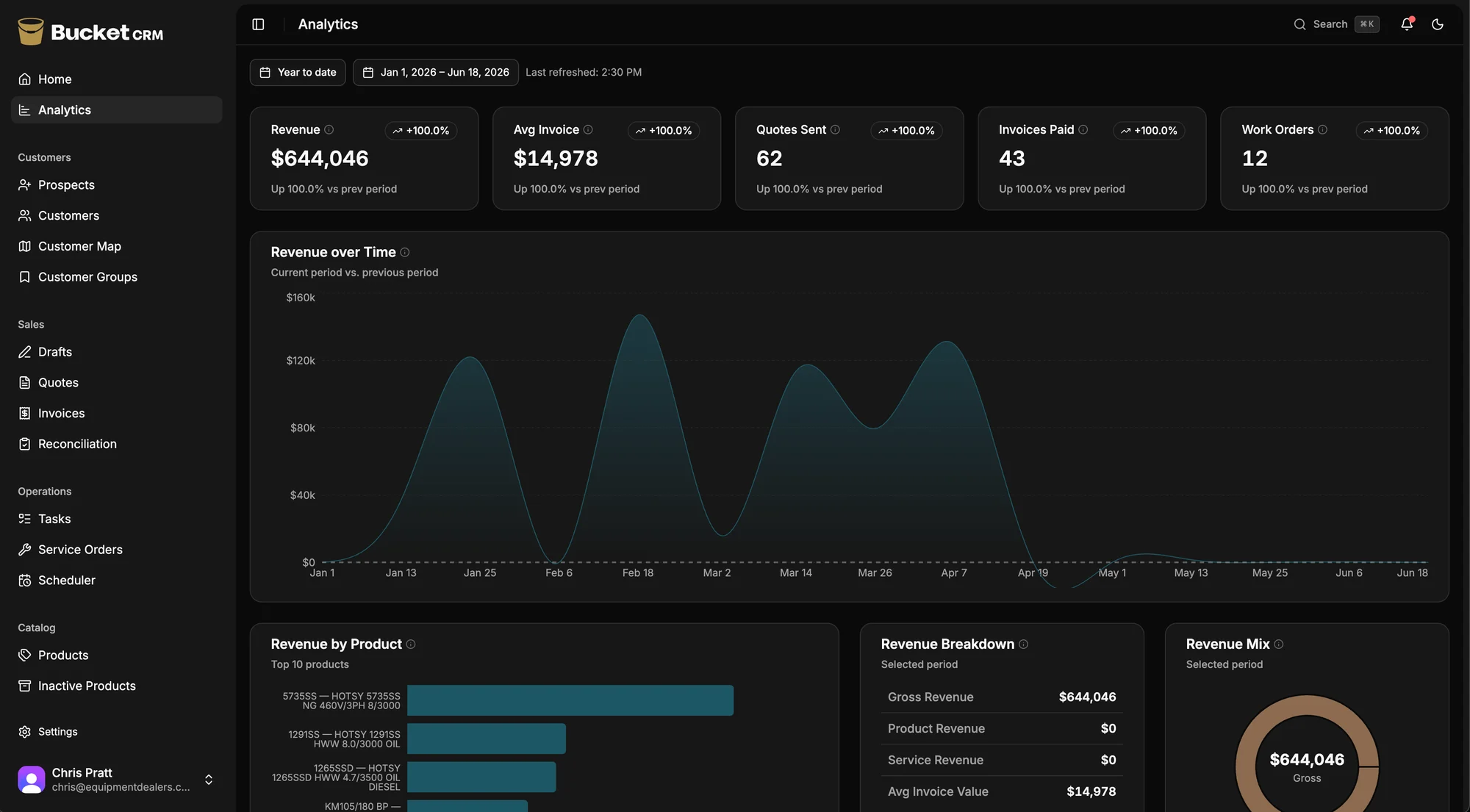
The difference, in one screen
Revenue by product, pipeline by territory, win rate, customer insight, all on one screen. It's the owner analytics QuickBooks was never built to produce.
Why this comparison matters
Here's something true of almost every equipment dealer: QuickBooks is doing more jobs than it was built for. It started as the place you do the books — invoices, bills, payroll, taxes — and it's genuinely good at that. But over the years it quietly became the place you also look up a customer's phone number, check whether someone paid, remember what you sold them, and track how many gallons of detergent are on the shelf. Not because QuickBooks is good at those things. Because it was already open, and nobody offered you anything better.
That's not a mistake on your part. It's the most natural thing in the world. You had QuickBooks for the money, you had a real business to run, and the customer stuff had to live somewhere. So it landed in QuickBooks customer records, in a spreadsheet next to QuickBooks, in a notebook by the phone, and in the heads of the people who've been there a long time. It works, mostly, until the day it doesn't.
The reason it eventually strains is simple. QuickBooks is built around the transaction — an invoice, a payment, a bill. Its customer record is really an accounts-receivable record: who owes what, who paid when. That's the right shape for accounting. It's the wrong shape for a relationship that lives in the equipment a customer owns and the service you've done on it for the last ten years. QuickBooks can tell you that the Johnson account is paid up. It can't tell you that the Johnsons' main pressure washer is twelve years old and due for replacement, or that your tech flagged a bad pump on their backup unit last spring.
So this page isn't an argument to leave QuickBooks. It's an argument about which job each tool should do. QuickBooks is your accountant. It's very good at being your accountant. It was never meant to be your salesperson's memory, your service department's logbook, or your parts room's inventory system — and when it's asked to be all of those, things start falling through the cracks between them.
A week in the life
Let's walk through five real moments in an equipment dealer's week, and what happens when your customer information lives in QuickBooks versus in Bucket. No marketing language. Just what actually happens at your desk, in the truck, and at the parts counter.
Monday morning
On QuickBooks
You want to figure out who to go see this week. QuickBooks shows you a customer list and an aging report — who owes you money and how overdue they are. That's useful for collections, but it's not how you plan sales. The customers worth visiting aren't the ones who owe you money; they're the ones with aging equipment, the ones you haven't talked to in a while, the ones whose machines are coming due for replacement. QuickBooks doesn't know any of that, because none of it is money-in or money-out. So you plan the week off memory, off a spreadsheet, or off whoever's been here longest and remembers.
On Bucket
You open Bucket on your phone. The Opportunity Map shows your whole territory, color-coded by equipment age. Red pins are customers with machines over ten years old — the upgrade conversations waiting to happen. Yellow pins are overdue follow-ups. You plan the week in five minutes, and the customers you visit are the ones most likely to buy. QuickBooks is still doing the books in the background; it just isn't the thing you reach for to decide where the sales are.
Tuesday
On QuickBooks
A customer calls — they bought a unit from you a few years back and it's making a noise. You pull up their record in QuickBooks. You see their invoices. You see what they've paid and what's open. You can probably figure out that they bought a unit from you, because there's an invoice for it. But which exact unit? What's the serial number? When was it last serviced, and by whom? What was replaced? Is there a second machine on the account? None of that is in QuickBooks, because none of it is a dollar amount. You piece together what you can from old invoice line items and then go ask someone who might remember. The customer waits while you assemble a picture QuickBooks was never built to hold.
On Bucket
You open the customer's record. You see every piece of equipment they own — model, serial, purchase date, full service history attached to each machine. The unit they're calling about shows its age, its last service, and the parts replaced on it. You see one open parts order. You see they're paid up — Bucket knows that because it handled the invoice. You see the rep who originally sold it. The whole picture is on one screen in two taps. You're back to the customer in twenty seconds.
Wednesday
On QuickBooks
Your tech grabs two gallons of detergent and a pump seal for a service call and heads out. In QuickBooks, inventory only moves when someone records it moving — usually on an invoice, usually later, usually by the office. QuickBooks Online tracks inventory in its Plus and Advanced tiers, and QuickBooks Desktop Enterprise has more advanced inventory still, so the capability exists. But for a service department, the timing is the problem: parts leave on a truck in the morning and get recorded that evening, or the next day, or whenever someone catches up. The count in QuickBooks is always a little behind the shelf. By the end of the month you're doing a manual adjustment to make the books match reality, and you still run out of a common part at the worst possible time.
On Bucket
When your tech logs the parts used on a service call, inventory deducts automatically, right then, from the phone in the field. The count on the shelf and the count in the system stay in step because they update at the same moment. When a part hits its reorder threshold, you get an alert before you run out. QuickBooks still gets the financial side — the cost, the invoice — because Bucket hands that across. Your parts room just stops being a guessing game.
Thursday
On QuickBooks
You open your QuickBooks reports. Profit and loss, balance sheet, A/R aging, sales by customer — these are good, real reports, and you should keep running them. But they answer money questions, not business questions. They won't tell you your win rate on quotes by territory, or where your open pipeline is sitting, or which salesperson is producing in which region, or how many of your customers are sitting on equipment old enough to replace. Those answers aren't in QuickBooks because they're not accounting — they're about customers and equipment and the future, and QuickBooks reports on transactions that already happened.
On Bucket
You open the territory analytics page. You see revenue by salesperson and by product line, win rate by territory, open pipeline by region, and the full quote-to-cash flow from first quote to paid invoice. You see how much upgrade-ready equipment is sitting in each territory. These are the questions you've been carrying in your head, answered in thirty seconds. QuickBooks keeps telling you what already happened to the money; Bucket tells you where the next money is.
Friday
On QuickBooks
A customer calls with a warranty question about work you did a couple of years back. You search QuickBooks. There's an invoice — you can see what you charged and what parts were billed. But the story of that visit — what the tech found, what he did, the photos he took, the note about the customer's second machine — none of that is in QuickBooks, because QuickBooks records the bill, not the work. The full picture is in a paper work order in a banker's box in the back room, or in a tech's old phone, or gone. You give the customer an answer that's mostly right and hope it holds.
On Bucket
You search the customer's record. Every service call ever done on every piece of equipment is there, tied to the customer, the machine, and the invoice. Photos attach automatically when a tech logs a service order. Parts used come from inventory and show on the invoice. The full picture from two years ago is one search away — no banker's box, no old phone. The customer gets a confident answer in under a minute.
Those are five moments. In every one, QuickBooks did its real job fine — it knows the money cold. What it can't do is hold the customer, the equipment, the service history, and the live parts count, because it was never built to. Bucket holds those. The money stays in QuickBooks. Nobody's asking the accountant to also be the salesperson's memory anymore.
The QuickBooks tax for equipment dealers
QuickBooks's cost as an accounting tool is on the invoice and worth every penny. The cost we're talking about here is different — it's what you pay, in time and missed sales, for the jobs QuickBooks is doing that it was never built for. None of these are QuickBooks's fault. They're the price of using one tool for a job that needs another.
QuickBooks is built around the transaction. Every record, at its core, is about money moving — an invoice, a payment, a bill. That's exactly right for accounting and exactly wrong for a customer relationship, which is about things that haven't turned into money yet: the machine that's aging toward replacement, the follow-up you owe, the quote you're chasing, the service the customer's due for.
The cost is everything that never becomes a clean transaction and so never gets tracked. The upgrade conversation you meant to have. The customer you meant to call back. The lead your tech spotted in the field. QuickBooks can't hold those because they aren't dollars yet — and the things that aren't tracked are the things that quietly slip.
Your follow-ups, your pipeline, the equipment your customers own and how old it is, the service history — the stuff that comes before the money — finally has a home. That's what Bucket is built around: the customer and the equipment, not the transaction. QuickBooks still gets the money when it arrives.
Open a customer in QuickBooks and what you're really looking at is an accounts-receivable record: their balance, their invoices, their payments. That's the correct shape for collections. It's the wrong shape for knowing your customer. There's no first-class place for the equipment they own, the age of each machine, the service history, the open quote, the note about their second unit. You can cram some of it into memo fields and custom fields, but you're bending an A/R record into a customer record, and it shows every time you go looking for something that isn't a number.
The cost is the daily friction of not having the picture. The salesperson walks into a visit not knowing about last month's service call. The person answering the phone can't quickly say what the customer owns. The owner can't see the relationship, only the receivables. Each one is small. Together they're the difference between a shop that knows its customers and one that just bills them.
Bucket's customer record is equipment-centric: every machine, its age, its full service history, the open quotes, the conversations, all on one screen. The money side stays in QuickBooks, where receivables belong.
QuickBooks can track inventory — Plus and Advanced on QuickBooks Online, and more capably in Desktop Enterprise. The trouble for an equipment dealer isn't whether it can; it's that accounting inventory updates on the accounting timeline, not the service-department timeline. Parts leave on a truck in the morning and get recorded when the office catches up. The count is always a little behind the shelf, so you reconcile by hand at month-end and still get surprised when a common part runs out.
The cost is the manual adjustments, the emergency parts runs, and the slow erosion of trust in your own numbers. When the count is never quite right, people stop trusting it and start eyeballing the shelf — which is exactly the manual habit the software was supposed to replace.
Your tech logs the parts on a service call and the count deducts the same moment, from the field, in real time. You get a reorder alert before you run out, and QuickBooks stays your books for the accounting side. Your count and your shelf stay in step because they move together.
QuickBooks reporting is built to answer money questions, and it answers them well: profit and loss, cash flow, A/R aging, sales by customer. What it can't answer are the questions that decide where your business goes next — win rate by territory, open pipeline by region, which rep is producing where, how much upgrade-ready equipment is sitting in your customer base. Those aren't accounting; they're customer-and-equipment intelligence, and QuickBooks doesn't have the data to produce them because it never collected it.
The cost is flying without instruments on exactly the decisions that matter most — where to send your reps, which territories to work, where the growth is. Most owners just don't get those answers, because assembling them by hand from QuickBooks exports is more work than anyone has time for.
Bucket reports on the customer and the pipeline: territory analytics, win rate by region, revenue by salesperson and product, the quote-to-cash flow. QuickBooks keeps reporting on the money. You get both sets of instruments instead of half of them.
Plenty of dealers have already felt QuickBooks straining as a customer system and reached for the obvious fix: bolt a CRM onto it. QuickBooks's own app marketplace points you straight at one — Method:CRM, built specifically to add customer management on top of QuickBooks. It's a reasonable instinct, and it's also a tell: even QuickBooks's ecosystem agrees QuickBooks isn't a CRM.
The cost is the same split-brain problem as any two-system setup. Now your customer data lives in QuickBooks and in the bolt-on CRM, the two have to sync, and you're paying and maintaining a second subscription to do a job your main customer system still can't. You've added a tool instead of solving the problem — and you still don't have equipment-centric records, the Opportunity Map, or real service-department inventory.
Bucket is one system for the whole customer side — sales, service, equipment, parts, history — while QuickBooks stays your books. One customer record, not a CRM bolted onto an accounting tool.
This is the one that names the whole problem, and it's a true story. A salesperson drives out to quote a long-time customer on a new machine — a good visit, a warm relationship, a real shot at a sale. What he doesn't know is that the customer is sixty to ninety days past due on $1,100, because the latest COD list hadn't made it out of accounting yet. He's out there selling to someone the office is about to put on credit hold. Nobody did anything wrong. The information just lived in two different places that never talked to each other.
That's the cost of the gap between the books and the field, and it runs both directions. Accounting doesn't see the upgrade conversation coming; sales doesn't see the customer's account status. The money lives in QuickBooks, the relationship lives somewhere else, and the two only meet by accident — usually at the worst possible moment.
Your salesperson sees the account is on hold before he drives out. Your office sees the upgrade quote before it's a surprise. The two halves of your business finally share a screen — the relationship lives in one place, and the money still lives in QuickBooks. The gap that cost the $1,100 closes.
That's the quiet cost of making your tools cover jobs they weren't built for. We'll show you what one system changes, on your own setup, in fifteen minutes.
Book a 15-minute demoWhat QuickBooks does well
This is the easiest honest section we'll write on any comparison page, because we're not asking you to leave QuickBooks at all. QuickBooks is the right tool for the accounting job, and Bucket doesn't try to replace it there. Here's what QuickBooks does well — the work it should keep doing in your shop.
Accounting is QuickBooks's home turf, and it's excellent at it. General ledger, accounts payable and receivable, bank reconciliation, financial statements — this is what QuickBooks was built for, and decades of refinement show. Bucket is not an accounting system and isn't trying to be. Keep QuickBooks for the books.
Tax time is genuinely easier with QuickBooks. Your accountant knows it, it produces the reports tax prep needs, and it connects to the tax tools and workflows accountants already use. That alone is a strong reason to keep it.
Payroll, bills, and bank feeds are mature and reliable. Paying employees, paying vendors, and reconciling accounts are core QuickBooks strengths across both QuickBooks Online and Desktop Enterprise. These aren't jobs Bucket does.
It's the standard your accountant and bookkeeper already use. QuickBooks is the most widely used small-business accounting software in the country. Your bookkeeper knows it, your accountant expects it, and that familiarity has real value. Switching your accounting off QuickBooks is a different and usually unnecessary project — and not one we're recommending.
The integration ecosystem is broad. QuickBooks connects to a wide range of tools, and Bucket is one of them. That's exactly how the two are meant to work together — Bucket for the customer side, QuickBooks for the books, with a clean connection between.
The point of this page isn't “leave QuickBooks.” It's “stop asking QuickBooks to be your customer system, your service logbook, and your parts room — because that's the part it was never built for.”
Where each tool fits
This isn't a head-to-head score — it's a division of labor. On the accounting side, the honest answer for most rows is “QuickBooks — keep it.” On the customer side, it's Bucket.
| Capability | QuickBooks | Bucket |
|---|---|---|
| General ledger / books | Core strength | Not an accounting system |
| Accounts payable / bills | Yes | — |
| Bank reconciliation | Yes | — |
| Payroll | Yes | — |
| Financial statements (P&L, balance sheet) | Yes | — |
| Tax prep support | Yes | — |
| A/R aging & collections | Yes | Sees paid / unpaid on its own invoices |
| Capability | QuickBooks | Bucket |
|---|---|---|
| Customer record | Accounts-receivable centric | Equipment-centric |
| Customer ↔ equipment linking | — | Native |
| Equipment-age tracking | — | Yes |
| Per-machine service history | — | Yes |
| The Opportunity Map | — | Signature feature |
| Follow-up / next-visit tracking | — | Yes |
| Sales pipeline (Kanban) | — | Yes |
| Capability | QuickBooks | Bucket |
|---|---|---|
| Estimates / quotes | Basic | Mobile quote builder |
| Quote-to-invoice (one tap) | Manual | Yes |
| E-signature on quotes | — | Yes |
| Forecast revenue from pipeline | — | Yes |
| Win rate / sales-cycle metrics | — | Yes |
| Capability | QuickBooks | Bucket |
|---|---|---|
| Service scheduling / dispatch | — | Yes |
| Mobile field app (iOS + Android) | — | Yes |
| Service order logging | — | Yes |
| Photos attached to service calls | — | Yes |
| Route ordering / crew visibility | — | Yes |
| Capability | QuickBooks | Bucket |
|---|---|---|
| Inventory tracking | Plus / Advanced / Desktop | Yes |
| Real-time deduction from service calls | Recorded on the books' timeline | From the field, instantly |
| Reorder alerts | Limited | Yes |
| Built for the speed of a service dept | Built for accounting accuracy | Yes |
| Capability | QuickBooks | Bucket |
|---|---|---|
| Money reports (P&L, cash flow, A/R) | Core strength | — |
| Territory analytics (geographic) | — | Yes |
| Win rate by territory | — | Yes |
| Pipeline by territory | — | Yes |
| Quote-to-cash flow (Sankey) | — | Yes |
| Item | QuickBooks | Bucket |
|---|---|---|
| CSV customer import | Yes | Yes |
| Data export (your data, any time) | Yes | Yes — no fee, no lock-in |
| Role in your stack | Accounting | Customers, sales, service, inventory |
The honest way to settle it is on your own customers. We'll put your territory on the map and walk the workflows on your data.
See it on your customer listWhy dealers move the customer side
Plenty of dealers run the whole business out of QuickBooks and a notebook for years. The move isn't to leave QuickBooks. It's to keep it for accounting and put the customer side somewhere built for it. Here's why that helps.
Tracking customers in QuickBooks and a spreadsheet hides business in plain sight. Seeing every customer on a map by equipment age surfaces upgrade revenue you've been driving past. QuickBooks keeps doing the books; it just stops being where customers live.
Reconciling parts at month-end and finding the count always off is normal in QuickBooks. When the tech logs parts from the truck, the count is right that day, and QuickBooks stays your books for the accounting side.
Driving out to quote a customer who's past due happens when sales and accounting never connect in time. Sales can see account status before they go, while accounting stays in QuickBooks where it belongs.
Bolting a CRM onto QuickBooks means paying for both. Bucket replaces the CRM and the inventory workaround and still hands accounting to QuickBooks. One place for the customer, books untouched.
They all started the same way: one short look at their own territory. Yours is fifteen minutes away.
Book a 15-minute demoBuilt by people who get this business
Most software for equipment dealers is built by software people who studied the problem from the outside. Bucket has a different origin. Its founding sales rep spent fifteen years selling equipment from a truck — units, parts, detergent, service contracts, the whole stack. He ran his customers the way most dealers do: QuickBooks for the money, a spreadsheet next to it, a notebook by the phone, and a lot of it in his head.
He felt every tax on this page personally. The customer record that was really just an invoice. The parts count that never matched the shelf. The day he drove out to quote a long-time customer on a new machine without knowing they were ninety days past due on $1,100, because the COD list hadn't made it out of accounting yet. “Nobody did anything wrong,” he says about that day. “The information just lived in two different places that never talked to each other.” That's the sentence the whole product is built around.
He tried the alternatives — HubSpot, Salesforce, Act!, Maximizer. They all wanted a big customization project, and none of them fit a dealer who sells and services equipment. So he enrolled in a coding bootcamp to understand the problem well enough to explain it, started talking to his cousin-in-law — an engineer who'd spent his career building software that stays correct and fast at scale — and they built the tool he'd wished existed. Bucket keeps QuickBooks for the books on purpose, because the goal was never to replace the accountant. It was to stop asking the accountant's software to remember the customers.
“Nobody did anything wrong. The information just lived in two different places that never talked to each other.”
How Bucket and QuickBooks work together
Setting up Bucket alongside QuickBooks isn't a migration off your accounting system — it's adding the customer-and-service brain your business has been missing, while the books you already trust stay exactly where they are. Here's exactly how it works, start to finish.
The division of labor
QuickBooks keeps doing accounting: the general ledger, payroll, bills, bank reconciliation, financial statements, tax prep. Bucket takes the customer side: customer and equipment records, the sales pipeline, quoting, service scheduling and logging, parts inventory, and the analytics QuickBooks can't produce. Neither tool is doing the other's job anymore, which is the whole point.
Sales always knows where the account stands
Quote, invoice, and payment all happen in Bucket — so the moment a customer pays, the account shows current, and your salespeople know whether an account is past due before they drive out. The gap that caused the $1,100 problem closes, and QuickBooks stays your books for everything on the accounting side.
You book a fifteen-minute initial call. We confirm fit, talk through your business — how many techs and reps, what you sell and service, how you're using QuickBooks today — and confirm that QuickBooks stays exactly where it is for accounting. If we're a fit, we schedule a longer onboarding session.
On a screen-share, we bring your customer list into Bucket — from a QuickBooks export, a spreadsheet, or wherever your customers live today — and start building equipment records, which is the part QuickBooks never had. Most dealerships' full customer data is in Bucket within a few days.
Sales reps, service techs, dispatcher, admin — your whole staff joins one call. We walk each role through their view: how the rep uses the Opportunity Map and pipeline, how the tech logs a service order and parts on the mobile app, how the admin handles invoicing and inventory. Two-tap design means most people are productive after a thirty-minute session.
Your team starts running customers, sales, service, and parts in Bucket. QuickBooks keeps running the books. Most dealerships are fully live within one to two weeks of the first call. Nothing about your accounting changed; everything about your customer side did.
On the cost
Bucket's onboarding is included, and we'll waive the standard onboarding fee for dealerships that fit our customer profile. There's no fee to keep QuickBooks, no fee to connect it, and no risk to your books. See the demo for the specifics on pricing.
When QuickBooks alone is enough
We're not going to tell you that every dealer needs Bucket. For some businesses, QuickBooks alone is genuinely the right and complete setup, and adding another tool would just be more than you need. Here are the cases.
If it's just you, you sell equipment, and you don't run service calls or carry parts inventory, most of what Bucket adds — the field app, service logging, parts deduction, the team handoffs — doesn't apply. QuickBooks for the invoices and a simple contact list may be all you need.
If you sell a machine, invoice it, and the relationship more or less ends there — no ongoing service, no upgrade cycle, no reason to track what a customer owns over the years — then the equipment-centric, long-relationship features Bucket is built around won't earn their keep. QuickBooks handles a transactional sale fine.
No service department, no parts room, no techs in trucks. The inventory and field pieces of Bucket are central to its value; without them, you're paying for capability you won't use.
If you can answer “who's due for an upgrade?” off the top of your head, your parts count matches the shelf, and nothing's falling through the cracks between the books and the field — then your current setup is working, and we'd rather you keep it than add a tool you don't need.
If, on the other hand, you've got a service side, you carry parts, you sell to customers you'll service for years, and you keep bumping into the limits of running all that out of QuickBooks — that's exactly the gap Bucket fills. Keep reading.
Common questions
No — and most dealers shouldn't. QuickBooks is excellent accounting software, and Bucket isn't an accounting system. The right setup for most equipment dealers is QuickBooks for the books and Bucket for everything on the customer side: sales, service, equipment records, parts inventory, and the analytics QuickBooks can't produce. The two sit side by side, each doing the job it's built for. You keep your accountant, your bookkeeper, and your books exactly as they are.
It can be stretched into one, and most dealers have done exactly that — but it wasn't built for it, and the seams show. QuickBooks customer records are really accounts-receivable records: they track who owes what and who paid when, not what equipment a customer owns, when each machine is due for replacement, or what your tech found on the last service call. You can cram some of that into memo and custom fields, but you're bending an accounting tool into a customer tool. Bucket is built customer-first and equipment-first, and QuickBooks stays your books, so the money still lands where your accountant expects it.
Bucket handles parts inventory the way a service department actually needs it: a tech logs parts used on a service call from the field, and inventory deducts in real time, with reorder alerts before you run out. QuickBooks can track inventory too — in its Plus and Advanced tiers and in Desktop Enterprise — but it updates on the accounting timeline, not the moment a part leaves the shelf, so the count is always a little behind. With Bucket, the operational count stays accurate, and QuickBooks stays your system of record for the books. You're not choosing accuracy over accounting; you get both.
Yes — because nothing about your accounting changes. QuickBooks stays your books, and your accountant keeps the tools and reports they already use. Bucket lives on the customer side of your business, not the accounting side. If anything, your accountant gets cleaner data, because the operational details that used to get crammed into QuickBooks now live where they belong.
They're different categories of tool, so it's not really a head-to-head price comparison — and you'll likely keep both, with QuickBooks for accounting and Bucket for the customer side. What we can say is that many dealers using QuickBooks as a CRM have already bolted on a separate customer tool (Method:CRM is the common one) and sometimes a separate inventory workaround on top of that. Bucket replaces those bolt-ons with one system, and QuickBooks stays your books. We share Bucket's specific number on the demo call once we know your team size.
Your data is yours, always. You can export your full customer list, equipment records, quotes, invoices, and service history at any time, at no charge — no contract lock-in, no export fee. And because QuickBooks stays your system of record for accounting, your books are never tangled up in the question. Bucket was built by someone who once got charged just to leave a previous system; we're never going to be the company that does that to you.
Yes. Book a fifteen-minute demo and bring a customer export from QuickBooks, a spreadsheet, or whatever you have. We'll show you your real territory on the Opportunity Map, walk through the equipment-dealer workflows on your data — not a demo dataset — and show you exactly how Bucket and QuickBooks split the work. No credit card, no commitment to sign on the call.
Yes. Plenty of dealers have already left a standalone CRM and gone back to running customers out of QuickBooks because the CRM didn't fit a sell-and-service business either. Bucket is built specifically for that business — equipment-centric records, the sales-to-service handoff, the Opportunity Map — and QuickBooks stays your books for the accounting side. You're not adding a CRM back on top of QuickBooks; you're putting the customer side in a tool that was actually built for your shop.
See Bucket on your real customer list
Bring a customer export from QuickBooks, a spreadsheet, or whatever you have today. We'll show you which of your customers are ready to upgrade — on your real territory, with your real data — in one fifteen-minute call, and we'll show you exactly how Bucket runs alongside QuickBooks so your books never miss a beat. No slides. No demo dataset. Your own numbers, your own machines, your own salespeople in the system. If QuickBooks alone is the right setup for you, you'll know in fifteen minutes. If it isn't, we'll show you what changes.
Compare Bucket to other tools: Jobber · ServiceTitan
Built for the field, not the office.