
Compare · Bucket vs Jobber
Jobber is built for service-only field-service businesses — landscapers, plumbers, HVAC contractors, cleaners, painters — across more than fifty different industries. Bucket is built specifically for one kind of business: shops that sell equipment and then service what they sold for years after. If your business is pure service work and you don't really sell new equipment, Jobber works fine, and you probably don't need to read the rest of this page. If you sell pressure washers, generators, tractors, compressors, forklifts, or any other equipment AND you have a service department under the same roof, the rest of this page is for you — because Jobber wasn't built for the way your business actually runs, and it shows up everywhere once you look.
You probably want Bucket if:
You probably want Jobber if:
The rest of this page walks through why, with real examples from an equipment dealer's week.
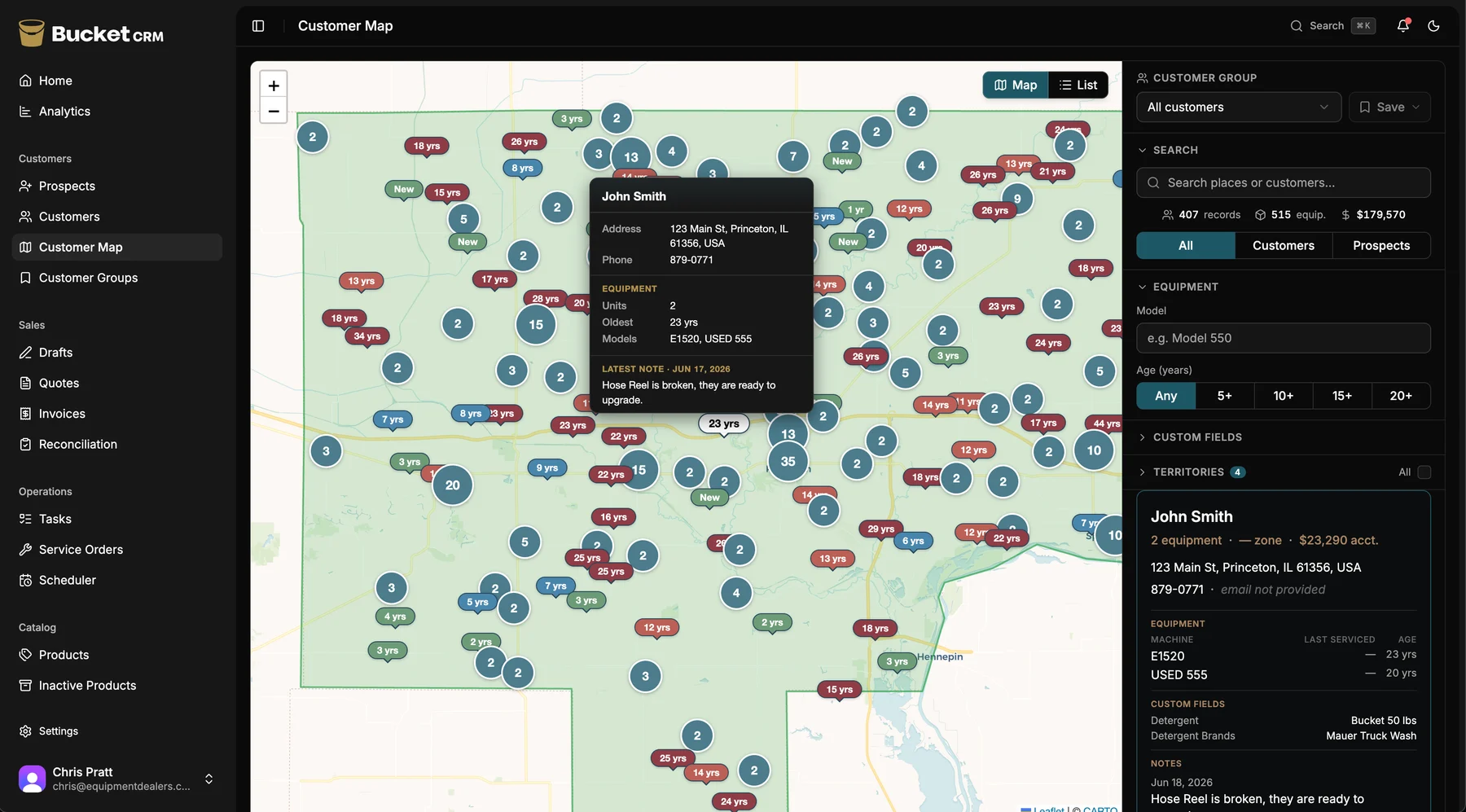
The difference, in one screen
The Opportunity Map puts your whole territory on one screen, color-coded by equipment age. Those upgrade conversations are ones Jobber has no way to surface.
Why this comparison matters
From the outside, an equipment dealer and a landscaping company can look like the same kind of business. Both have trucks. Both have techs. Both go out to customer sites. Both invoice customers when the work's done. Field-service software companies see those similarities and build one product for everyone.
But the businesses are different in one fundamental way, and that one difference changes everything about which software actually fits. A landscaping company sells labor. They show up, they cut the grass, they bill for the hour, they leave. There's no machine left behind that they're going to be responsible for in three years. The job is the job.
An equipment dealer sells a machine — and then becomes responsible for keeping that machine running for the next ten years. The customer who buys a Hotsy 855SS from you in 2018 is going to need parts in 2019. A service call in 2020. Another service call in 2021. A new burner in 2022. And in 2027, they're going to replace that unit — with another Hotsy if you're the one who called them at the right moment, or with a competitor's machine if you weren't.
That changes what the software has to do. It has to track equipment, not just jobs. It has to connect a sale to a service history. It has to surface upgrade conversations before the customer goes shopping. It has to handle a sales team and a service team in the same system, because the salesperson needs to see what the tech saw last month. Jobber was built before that second business existed in its catalog — and it still treats jobs as the center of the universe. Bucket was built for the second business specifically.
A week in the life
Let's walk through five real moments in an equipment dealer's week, and what happens in each piece of software. No marketing language. Just what actually happens at your desk and in the truck.
Monday morning
On Jobber
You open the app on your laptop. You see this week's calendar — Tuesday is full, Wednesday has some open slots, Thursday a tech is out. The calendar's clean and easy to read. But planning the week isn't just looking at the calendar. It's deciding which customers to visit. And for that, Jobber doesn't help much. You scroll through customer names, trying to remember who you haven't called on in a while. Maybe you check a spreadsheet on your desktop. Maybe you go off your memory. The reps who are good at this have it in their heads; the ones who aren't lose deals to forgetting.
On Bucket
You open Bucket on your phone. The Opportunity Map shows your whole territory, color-coded by equipment age. The red pins are customers with machines over ten years old — the upgrade conversations waiting to happen. The yellow pins are customers with overdue follow-ups. The map remembers who needs attention so you don't have to. You spend five minutes planning the week instead of an hour, and the customers you visit are the ones most likely to buy.
Tuesday
On Jobber
A customer calls. They bought a Hotsy 855SS from you a few years back and the unit's making a noise. You open their record in Jobber and find their contact info and a list of past jobs. But the rest of the picture isn't here. Which exact unit were those service calls on? When was the last burner replacement? What else do they own? Is there an open quote? Jobber's record is built around jobs, not equipment — so those answers live somewhere else. You pull up QuickBooks for the invoice history. You dig through the paper service orders in the filing cabinet. You call the salesperson to ask about the quote. The customer's still on the line, and the whole picture never comes together — because no single place holds it.
On Bucket
You open the customer's record. You see every piece of equipment they own, with model number, serial number, purchase date, and full service history attached. The 855SS shows its age (seven years), its last service (eight months ago), and the burner that was replaced in 2023. You see one open parts order. You see their account is paid up. You see the salesperson who originally sold them the unit. The whole picture is on one screen in two taps. You're back to the customer in twenty seconds.
Wednesday
On Jobber
Your tech is at a customer's shop. He's there to do a routine PM on their main pressure washer. While he's there, he notices their second unit — an older one, twelve years old — is barely running. The pump's making a sound he doesn't like. He fixes the first unit, drives back to the office, and meant to mention it but got pulled into another call. By the time he remembers, it's been two weeks, and the salesperson has driven past that customer's shop three times without knowing to stop.
On Bucket
Your tech opens the service order on his phone. There's a notes field tied to each piece of equipment. He writes “second unit (twelve years old) — pump making a knocking sound, recommend evaluation for replacement” and saves. That note shows up on the salesperson's customer record the next morning, flagged for attention. When the salesperson plans Wednesday's route, the customer's shop is highlighted on the map — with the tech's note attached. The salesperson knows exactly what to talk about before walking in. Your service team just handed your sales team a warm lead, and nobody had to pick up the phone.
Thursday
On Jobber
You open the reports section. You see jobs completed this month. You see revenue. You see invoices outstanding. Good reports, well-designed. But here's what you actually want to know: which territories are producing? what's the win rate on quotes by area? where is the open pipeline sitting — by region? Jobber doesn't answer those questions. The data exists somewhere — in jobs, in invoices, in quote records — but Jobber doesn't aggregate it that way. You'd have to export to Excel and rebuild the report yourself. Most owners don't, which means they're flying without the instruments.
On Bucket
You open the territory analytics page. You see a map of your service area with revenue overlaid geographically. You see win rate by territory — this region is closing 52%, that one is closing 31%. You see open pipeline by territory: $94,000 sitting in quotes-plus-invoices in your north territory, $43,000 in the south. You see which rep is producing where. The questions you've been carrying in your head get answers in thirty seconds. The instruments are on.
Friday
On Jobber
A customer calls with a warranty question on work you did in early 2023. You search Jobber. The job exists, but the notes are sparse — the tech who did the work was new at the time, and not everything got logged consistently. The parts used are listed on the invoice. The photos, if any, are in someone's phone. You spend fifteen minutes building a picture of what happened on that visit. You give the customer an answer that's mostly right.
On Bucket
You search the customer's record. Every service call ever done on every piece of equipment is there, tied to the customer, the machine, and the invoice. Photos attach automatically when a tech logs a service order. Parts used come from inventory and show on the invoice. The full picture from January 2023 is one search away. The customer gets a confident answer in under a minute.
Those are five moments. Multiply them across every week of the year, and they're what the math comes down to. Jobber works well for the work it was designed for. For an equipment dealer, those five moments are the work — and they're where Jobber wasn't built to help.
The Jobber tax for equipment dealers
Jobber's sticker price is what you see. The real cost of running a dealership on Jobber isn't the sticker — it's the things you have to buy or build alongside it because the product doesn't cover them. Here's what that adds up to.
Most equipment dealers running Jobber also run a second system for sales — Act!, Maximizer, HubSpot, Salesforce, or a homegrown spreadsheet. The reason: Jobber's CRM features are job-centric. There's no real sales pipeline. There's no way to track a multi-month equipment deal from prospect to close. So the sales side of your business lives somewhere else.
Two systems means two logins, two places customer data lives, two places to update when a customer changes phone numbers, and two places the sales team and the service team can't see each other's work. Acquisition cost is real (another monthly subscription), but the bigger cost is the split brain — your sales team doesn't see the service calls, your service team doesn't see the quotes, and the customer's full picture lives in nobody's head.
Your sales pipeline and your service history live in one customer record. One login. One picture.
Jobber tracks parts as line items on quotes and invoices, but it doesn't have an inventory system. There's no SKU table, no stock counts, no auto-deduction when a tech uses a part on a service call. For an equipment dealer, that means parts inventory lives in QuickBooks — which is what most dealers use, by default, because nothing better is offered to them.
QuickBooks works for accounting. As an inventory system, it's awkward — it wasn't designed for the speed of a service department. You can't easily say “the tech used two gallons of detergent on the Johnson job” and have that flow through automatically. You end up doing manual inventory adjustments at the end of the month, and the count never quite matches reality.
Bucket's inventory system is modeled on Shopify's — clean SKU tracking and auto-deduction when a service call logs parts used. QuickBooks stays in your books for accounting. It stops being your inventory system.
Jobber prices by the user, and a Jobber seat buys scheduling. The same person still needs the sales pipeline, the parts inventory, and the full customer history — and those live in other software you're also paying for, often by the head too. Counting Jobber's per-user price alone tells you what one slice costs, not what the whole stack costs.
Add it up the honest way: per person, across every tool it takes to run the dealership. That's the number that matters, and it's the one a single-tool price hides.
A Bucket seat covers the whole operation — sales, service, parts, payments, and customer history — in one system. You're paying for one tool that does the work of four, instead of four tools that each bill by the head.
Jobber's base subscription doesn't include marketing automation (Marketing Suite) or AI call handling (AI Receptionist) — both are paid add-ons. For a dealership that wants to run customer campaigns or pick up calls after hours, the bill climbs past the base plan.
You get automated appointment reminders to customers and texting tied to service jobs, but you won't find AI Receptionist or Marketing Suite features today, and those aren't in the near-term plan. If Marketing Suite or AI Receptionist are make-or-break for you, Jobber wins on those specifically — and that's a real reason to stay. We'd rather you pick the tool that fits the job than oversell what we have.
This is the one most owners don't see until they look for it. Jobber doesn't track equipment ownership as a first-class object. Customers have job histories; they don't have equipment histories. So when you want to ask “which of my customers own machines older than ten years?” or “which territories have the highest concentration of upgrade-ready equipment?” — the questions don't have answers in Jobber. Not because the data is missing, but because the data model wasn't designed to surface it.
The cost of not knowing is invisible because you don't see what you're missing. The customer who would have bought a new unit if anyone had asked — they bought from a competitor instead. The territory with twenty machines aging into replacement — they got worked when someone happened to drive through, not when the data said to. Multiply across a year and the number is real, even though it never shows on any report.
Bucket's Opportunity Map is built around exactly that problem. Every customer's equipment, every machine's age, the whole territory color-coded. The upgrade revenue that was invisible is visible.
Add it up. Your customers live in Jobber (jobs), in QuickBooks (invoices and inventory), in Act! or a spreadsheet (sales pipeline), and in someone's phone (texts, photos, voicemails from the customer). When a customer calls and asks about a service from two years ago, the answer takes twenty minutes to assemble because it lives in four places.
The cost is your team's time, every time. It's the receptionist who can't quickly answer a question. It's the salesperson who walks into a visit not knowing about last week's service call. It's the owner who can't get a clean number for last quarter's pipeline. None of these are crises by themselves. Together, they're a tax you pay every day.
Your whole customer history — sales, service, parts, payments, conversations — lives in one record. One search. One answer.
That's the quiet cost of making your tools cover jobs they weren't built for. We'll show you what one system changes, on your own setup, in fifteen minutes.
Book a 15-minute demoWhat Jobber does well
The hardest version of this comparison page is the honest one. Jobber has more than 400,000 customers for a reason. It's a mature, well-designed product, and it does several things better than most competitors. For an equipment dealer, here's where Jobber actually shines.
The industry breadth is a real asset for some businesses. If your work spans multiple service categories — say you do landscaping in the summer, snow removal in the winter, and a little pressure-washing on the side — Jobber's 50+ industry templates and broad feature set fit that kind of mixed business. Bucket doesn't try to cover all that ground; it picks one category and goes deep.
If you'd rather evaluate software on your own, Jobber's self-serve model fits you better. Sign up, import data, try it for two weeks, decide — no demo required, and some buyers strongly prefer that. Bucket is demo-first on purpose: most of the owners we work with would rather have someone walk them through it and answer their questions than poke at a trial alone, and seeing your own territory on the Opportunity Map lands in a fifteen-minute call. If hands-off is how you like to buy, that's a point for Jobber.
The product is mature and battle-tested. With 400,000+ customers and 13,861 App Store reviews at 4.8 stars, Jobber has handled just about every edge case in field-service operations. If a long track record and a huge install base are what you weight most heavily, that maturity is real.
The customer base and brand recognition are real social proof. Bucket is a vertical specialist, not a generalist with hundreds of thousands of customers. If maximum scale and name recognition are what you're optimizing for, Jobber wins.
If two or more of those things are critical to you, the rest of this page may not matter — Jobber may be the right pick. If your work is mostly equipment sales and service, keep reading.
Feature by feature
Each row is honest — we don't fake a checkmark where the truth is “limited.”
| Capability | Jobber | Bucket |
|---|---|---|
| Drag-and-drop service calendar | Mature | Mature |
| Mobile field app (iOS + Android) | Mature | Mature |
| Route ordering by drive time | Yes | Yes |
| Auto appointment reminders | Yes | Yes |
| Crew management | Yes | Yes |
| Offline mode (full sync) | Limited | Yes |
| Recurring job templates | Yes | Yes |
| Capability | Jobber | Bucket |
|---|---|---|
| Mobile quote builder | Yes | Yes |
| Quote-to-invoice (one tap) | Yes | Yes |
| Stripe payments (card + ACH) | Yes | Yes |
| E-signature on quotes | Yes | Yes |
| Full sales pipeline (Kanban) | Basic CRM only | Yes |
| Forecast revenue from pipeline | No | Yes |
| Sales-cycle metrics by rep | No | Yes |
| Capability | Jobber | Bucket |
|---|---|---|
| Customer record | Job-centric | Equipment-centric |
| Customer ↔ equipment linking (first-class) | No | Yes |
| Equipment-age tracking | No | Yes |
| Per-machine service history | Spread across job notes | Native |
| The Opportunity Map | No | Signature feature |
| Sales-to-service handoff (notes flow) | No | Yes |
| Sales-from-service handoff (tech leads) | No | Yes |
| Capability | Jobber | Bucket |
|---|---|---|
| Parts as quote/invoice line items | Yes | Yes |
| SKU-level inventory tracking | No | Yes |
| Auto-deduction from service calls | No | Yes |
| Inventory reports | No | Yes |
| Capability | Jobber | Bucket |
|---|---|---|
| Revenue dashboard (period-over-period) | Yes | Yes |
| Revenue by salesperson | Limited | Yes |
| Revenue by product line | Limited | Yes |
| Territory analytics (geographic) | Basic | Yes |
| Win rate by territory | No | Yes |
| Pipeline by territory | No | Yes |
| Quote-to-cash flow (Sankey) | No | Yes |
| Capability | Jobber | Bucket |
|---|---|---|
| Role-based permissions | Limited | Yes |
| Sales + service + dispatch + admin roles | Not natively differentiated | Yes |
| Capability | Jobber | Bucket |
|---|---|---|
| CSV customer import | Yes | Yes |
| Data export (your data, any time) | Yes | Yes — no fee, no lock-in |
| Capability | Jobber | Bucket |
|---|---|---|
| Marketing automation (email/SMS campaigns) | Paid add-on | — |
| AI Receptionist (after-hours calls) | Paid add-on | — |
| Online booking widget | Yes | — |
| Automated appointment reminders | Yes | Yes |
| Item | Jobber | Bucket |
|---|---|---|
| Onboarding | Self-serve or paid help | Guided onboarding included; fee waivable |
| Sales motion | Self-serve SaaS | Consultative |
The honest way to settle it is on your own customers. We'll put your territory on the map and walk the workflows on your data.
See it on your customer listWhy dealers switch
Jobber is a solid service tool. The dealers who leave it aren't unhappy with scheduling — they've outgrown a service-only system once they're selling equipment too. Four reasons it happens.
Dealers running Jobber for service, a separate CRM for the pipeline, and QuickBooks for parts collapse it into one login — one customer record, one map of the territory, one bill.
Crews already used to Jobber move over without a training week. The two-tap rule means the next thing they need is always two taps away — fewer “how do I do this?” calls from the truck.
Jobber schedules the work you already have. The Opportunity Map surfaces customers with aging equipment you haven't called on in years — upgrade sales that were invisible before.
Jobber fits a pure service shop. The moment a dealership sells equipment too, the gaps show. Bucket is built for both sides of the business from the start.
They all started the same way: one short look at their own territory. Yours is fifteen minutes away.
Book a 15-minute demoBuilt by people who get this business
Jobber was started in 2011 by software engineers who watched their service-pro customers struggle with paperwork. It's a great origin story for a service-pro tool, and Jobber became the category leader because that origin produced a product that fits service-only businesses well.
Bucket has a different origin. Matt — our founding sales rep — spent fifteen years selling from a truck — Hotsy units, parts, detergent, service contracts, the whole stack. He tried HubSpot, Salesforce, Act!, Maximizer. They all said the same thing: “Not without a big customization project.” One vendor quoted a steep setup fee and a year-long timeline for a “maybe.” Another charged him for seats of software that didn't fit, then charged him again just to export his own customer list when he left.
So he enrolled in a coding bootcamp — not to become a developer, but to understand the problem well enough to explain it to someone who could actually build it. Around that time he started talking to his cousin-in-law, an engineer who'd spent his career building software that stays correct and fast at scale. The engineer listened, agreed the tool needed to exist, and started building. Every feature in Bucket exists because something specific failed in a dealership. The two-tap rule. The Opportunity Map. Equipment-age coloring. The sales-to-service handoff. None of them came out of a competitive analysis. They came out of fifteen years of selling equipment and wishing the software fit.
“Every feature shipped passed one test: would I have used this on the truck yesterday? If the answer was no, it didn't ship.”
How the switch works
Software switches sound scary — data migration, team retraining, downtime risk. They don't have to be. Here's exactly what happens, step by step, when a dealership moves from Jobber to Bucket.
Jobber lets you export your customer list, your job history, your invoices, and your payment records to CSV at any time, for free. Your data is yours; Jobber doesn't hold it hostage. You log into Jobber's web app, go to Settings → Data Export, and run the export. It takes a few minutes. You'll get a ZIP file with your customer records, jobs, quotes, invoices, payments, and notes.
You book a fifteen-minute initial call. We confirm fit and talk through your business — number of techs, number of reps, what verticals you serve, what's been frustrating you about Jobber. If we're a fit, we schedule a longer onboarding session.
On the onboarding session, we sit on a screen-share with you and map your Jobber fields to Bucket fields. Customer records, contact info, addresses, job histories, invoices, payments — all of it migrates. We build your equipment records from your job-history notes, which is the part that takes the most attention because Jobber doesn't track equipment as a first-class object. Most dealerships' full data is in Bucket within a few days.
Sales reps, service techs, dispatchers, admin — your whole staff joins one call. We walk each role through their specific view of Bucket: how the rep uses the Opportunity Map and the sales pipeline; how the tech logs a service order on the mobile app; how the dispatcher uses the calendar; how the admin handles invoicing and inventory. Two-tap design means most people are productive after a 30-minute session.
Some dealerships run Jobber and Bucket side-by-side for one to two weeks to make sure nothing slips. Most dealerships skip this and cut over directly. We support either path.
Once your team is using Bucket and the books match, cancel your Jobber subscription. Most cutovers happen within one to two weeks of the initial onboarding call.
On the cost of switching
The migration itself doesn't cost extra. The Bucket onboarding is included and we'll waive the standard fee for dealerships that fit our customer profile. We'd rather you switch successfully than hesitate over the upfront number — see the demo for the specifics on pricing.
When dealers stay on Jobber
If we believed Bucket was the right answer for every business with a truck, we'd be the same kind of generalist Jobber is. We're not. We're a vertical specialist, and there are real businesses where Jobber is a better fit than Bucket. Here are the cases.
If you don't sell equipment and you're not interested in starting to, most of Bucket's differentiators (the Opportunity Map, equipment-age tracking, sales pipeline) don't apply to you. Jobber's service-job-centric model is a better fit.
If you do mostly landscaping, mostly plumbing, mostly HVAC, mostly cleaning — and equipment sales is less than 20% of your revenue — Jobber's industry-specific templates and feature depth in those categories will serve you better.
Those are paid add-ons in Jobber, but they exist and they work. Bucket doesn't have those features today. If they're critical to your operation right now, Jobber wins on those specifically.
Three-person shop, one tech, one owner, one admin. Jobber's working. The team has it dialed. The switch cost (data migration, team retraining, change management) outweighs the marginal benefit of Bucket's deeper features. Stay where you are. We mean that — we'd rather you stay on Jobber than switch and regret it.
Jobber lets you sign up and try the product without a sales call. Bucket is demo-first because we want to walk you through your real territory on the Opportunity Map — that's where Bucket's value clicks. If you'd rather poke around without talking to anyone, Jobber's model fits you better.
If none of those apply and you're an equipment dealer with sales AND service, keep reading.
Common questions
The honest answer depends on your team size and what you're paying for today. Most equipment dealers running Jobber also pay separately for a CRM (Act!, Maximizer, HubSpot), an inventory system (QuickBooks is the usual workaround), and sometimes a marketing add-on — several tools, several bills. Bucket replaces that operational stack with one system. We don't post pricing because the only comparison that matters is your real numbers against your current stack — book a fifteen-minute demo and we'll do that math with you.
Technically yes; long-term, we don't recommend it. Running both means your customer data lives in two places — and that's the exact problem most dealerships switch to escape. Some dealerships run Bucket and Jobber in parallel for one to two weeks during the cutover as a safety net, then cancel Jobber. After that, the simplification is the whole point.
It moves with you. Jobber exports your customer list, job history, invoices, quotes, and payments to CSV at no charge. During Bucket's onboarding session we import all of it, including reconstructing equipment records from your job-history notes where possible. Your historical data is fully searchable in Bucket from day one. Nothing is left behind.
For the core field-service operations — job scheduling, dispatch, mobile field app, quote builder, invoicing, online payments — yes, and in most cases more. The features Jobber has that Bucket doesn't ship today are the AI Receptionist add-on, the Marketing Suite add-on, and the online booking widget. If any of those are mission-critical for your operation right now, Jobber wins on those specifically.
Most dealerships are fully migrated within one to two weeks of the initial onboarding call. The data migration itself happens in a single onboarding session. Team training is a 30-minute walkthrough per role. The optional parallel run adds another week. The cutover itself — turning off Jobber, going live on Bucket — is usually a single day. We've yet to see a dealership take more than three weeks end to end.
That's exactly the case Bucket was built for. Most equipment dealerships are part service, part sales, and the proportions shift over time. Bucket handles the service-only workflows (scheduling, dispatch, mobile field, invoicing) and the equipment-sales workflows (pipeline, equipment quoting, customer-to-equipment linking) in the same system. Reps and techs see different views of the same customer; nothing falls between the two sides.
Bucket is a funded company built by an equipment sales rep with fifteen years of field experience and an engineer who spent his career building software that stays reliable and fast at scale. The CRM is what Hotsy dealers run on; we've been invited to speak at the Hotsy Great Dealer Roundup. We're a vertical specialist, not a generalist trying to cover 50+ industries — that's the point.
The honest answer is: it depends on how the switch is run. We design Bucket around a two-tap rule — every information lookup is two taps or fewer from the home screen — specifically to make sure field techs and sales reps actually use it instead of quietly going back to paper or to whatever they were used to. The 30-minute role-specific walkthrough during onboarding matters more than people think; teams that get that walkthrough adopt fast. Teams that skip it sometimes drift.
Yes. Book a fifteen-minute demo and bring a customer list, a CSV export from Jobber, or whatever data you have today. We'll show you your real territory on the Opportunity Map, walk through the equipment-dealer workflows on your data — not on a demo dataset — and answer the specific questions you have about pricing, migration, or your team's setup. No credit card. No commitment to sign on the call.
Your data is yours. You can export your full customer list, equipment records, quotes, invoices, and service history from Bucket at any time, at no charge. There's no contract lock-in, no export fee, no hostage situation. We were built by someone who once paid just to leave a previous CRM — we're never going to be the company that does that to a customer.
See Bucket on your real customer list
Bring a CSV from Jobber, a QuickBooks export, or whatever customer data you have today. We'll show you which of your customers are ready to upgrade — on your real territory, with your real data — in one fifteen-minute call. No slides. No demo dataset. Your own numbers, your own machines, your own salespeople in the system. If it doesn't fit, you'll know in fifteen minutes. If it does, we'll talk about next steps.
Compare Bucket to other tools: ServiceTitan · QuickBooks
Built for the field, not the office.